Ads 468x60px

Pages

Showing posts with label Blogger Help. Show all posts

Tuesday, March 8, 2011

10 Things Every Blogging Office Needs

A guest post by James Adams, editor and contributor to the CreativeCloud blog.

Being a professional blogger isn’t as simple as waking up one morning and stating, “I am a blogger, look out world!” Like any other discipline or endeavour, being a successful blogger means that you have to take the job seriously. That means working with dedication, planning and forethought. Having the right tools is an essential part of being a blogger, as you need the right tools in order to get the job done.

1. Computer or Laptop: There is no doubt one of the key tools of the modern journalist and the pro blogger is the computer. After all, the computer has become the informational link to the world. Blogging is all about information and staying current with what is happening in the world around us. This means that your computer is an essential tool in your blogging toolkit. While it is not necessary to have a top of the line gaming computer, you should have one that can get the job done or you will lose hours and hours on productivity. Making sure that you have a quality anti-virus program and firewall might be savvy addition as well.

2. Top-Notch Monitor: A reasonably large high quality monitor is an essential tool not just for bloggers, but also for anyone spending a lot of time at the computer. Eyestrain can greatly impair your productivity and make working nothing short of unpleasant. Spending a little extra money for a quality monitor is a savvy move.

3. Broadband Access: It should come as no surprise that access to a broadband connection is essential for blogging. While some people do still use dial-up Internet, you will experience major setbacks if you don’t have access to a fast connection. If you are using a laptop computer, be sure that you have a 3G dongle device for your mobile broadband access.

4. The Smartphone: A good smartphone is an absolute essential for the blogger. This is particularly true if you have one with a good deal of functionality and apps. A smartphone can function something like a modern Swiss army knife and may include GPS, recording capability, note taking capability, as well as essential features such as a camera and video capability. Also a smartphone allows you to connect to the Internet whenever you like from virtually wherever you like. This can prove invaluable for any number of important reasons. Of course, your trusted smartphone also functions as a phone too! All of these factors combine to make the smartphone a simply essential tool.

5. The Notebook or Notepad: Sure a notebook or notepad might be a bit “old school,” but you never have to worry about the battery on your notepad running out! This makes the time honoured, battled tested notepad something of a practical real world essential. It is something that you should not be without for quickly jotting down ideas on good old-fashioned paper.

6. Pens, Pens and More Pens: Pens are always a must for the blogger. Not all note taking is digital... at least not yet.

6. A Good Desk: Having a good desk might seem like a no-brainer, but if you are going to be spending hours upon hours writing, you need to keep the importance of a good desk in mind. A good desk will also help keep you organised and enhance your productivity.

7. The Chair: A comfortable chair, one that you can spend hours in, is probably even more important than having a good desk. After all, back problems will quickly end your workday.

9. A Bookcase: You never know when you might want to include a reference to a book in your blogging endeavours. A bookcase is important for staying organised. Don’t skip this inexpensive item that is essential for keeping books in order.

10. A Quality Keyboard: Lots of blogging means lots of typing. This makes an investment in a comfortable keyboard a must. Don’t just assume that the keyboard you received with your computer is adequate.

Image credits: Ben's Biz Blog


James works at Office Kitten, a UK based supplier of envelopes for businesses and other office stationery.

Thursday, February 3, 2011

How to Choose Brilliant Images for Your Blog Posts

A guest post by James Adams, editor and contributor to the CreativeCloud blog.


An image - worth thousand words!
We are living in a world that rewards instant gratification; people do not want to take the time to read a book, if the movie is available. In other words, "a picture is worth a thousand words." It should not be difficult to see why illustrations are important when keeping readers interested in your blog posts. Pictures can help readers to follow your writing more easily, breaking up the text so that it doesn't look like one long, tedious piece of work.
Here are some tips on how to choose the best images for your blog posts:

(#1.) Relevance - blog posts are generally there to persuade readers to show interest in a certain topic, product, or service. Adding pictures to help illustrate those concepts can only help, but don't go overboard. Shy away from adding pictures for the sake of adding pictures. Make sure that you are putting up illustrations that are going to add to the relevance of your text, not take away from it. It is easy to add too much, so try to keep it straight forward and to the point, just like the text.

(#2.) Copyrights - always remember that not all images are available for your use. There are copyrights for images that are on the internet as well as copyrights for images that are in print. If you want to avoid any problems that you might encounter with copyrighted materials, use your own images. Go looking for images that give relevance to your post and take the pictures yourself. If that doesn't seem like a viable option for you, there are public image sites that you can locate off of any search engine. Most search engines will provide you with an image option; type in the object or term that you are looking for and browse through the hundreds of images that are available to use without objection. If you find an image on another blog or site that you would like to use, remember to be courteous. It is polite to send a short email or contact the owner of the site asking for permission to use the image.

(#3.) Editing - it is important to do minor (and sometimes major) editing on your images before just sticking them up on your blog. It is more than aggravating to have to wait an eternity for a page to load because the file is too large. In fact, in this "instant gratification" world, no one waits for a page to load for very long without just moving along. If you have a file to add that is of larger size, put a thumbnail up on the page. If users want to wait to view the full photo, they have that option. If not, it doesn't create problems when loading. When finalising photos or images for your blog post, keep clarity in mind. A clean and crisp image gets the point across a lot better than an unclear one. Photoshop is a great tool to use before putting pictures up on your blog; you can add or subtract from an image as needed, and sometimes it is needed.

(#4.) Avoid - there are some things that you should try and avoid when choosing images for your blog post. For instance, animations are great and can potentially add just the right ingredient to your post, but it is important to think about internet connections. Some people don't have the fastest connections, and you don't want to alienate parts of your audience. It is also a good idea to stay away from background images; they can slow the process of loading your page down to snail pace. Account for those readers who may want to print your post without the background attached.

(#5.) Include - there are images that are better to use than others and should be highly considered. You want to make sure that you are using unique illustrations. If people have seen the image a thousand times, it loses its weight. People associate certain objects with a product or service and you want your readers to associate illustrations with your work. Include pictures that capture the essence of what you are trying to relay to your readers, it doesn't have to be completely literal. Capitalise on reader satisfaction by using photos that mean something to them; use pictures of people, kids, animals. Everyone likes to laugh, so adding a humorous image is a tool that will keep readers returning to your page. This is your chance to shine, to set yourself apart from similar blogs or from those that are selling the same product or service. Images can very easily turn into a mascot for a particular product, site or service. Mascots can be very beneficial to a business and finding a good one starts with searching through images that are relevant to your end goals.

Image credits: The Thinking Blog

James Adams normally reviews consumables for Canon printers at the UK's biggest online supplier of printer cartridges, Cartridge Save.

Monday, December 20, 2010

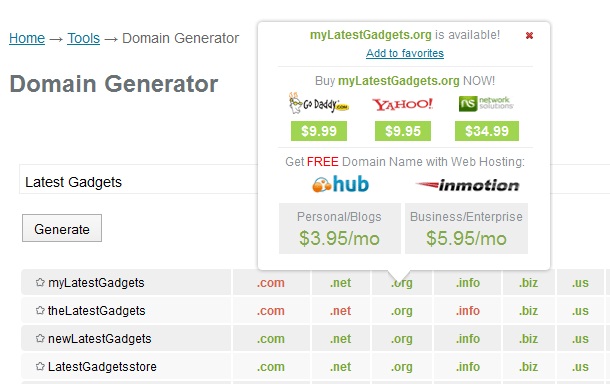
PCNames - Instant Domain Availability Checking Tool

PCNames
Purchasing domains these days is definitely more than just having an online presence. It is in fact, no less than the real estate business. Just as a piece of land or a house you can purchase and sell IP numbers (domain names) online. Be the first one to guess the value of a domain name, register it and you will be sitting on a gold mine a few months/years later.
But nowadays, to purchase a domain you have to check not only at the domain registrars but also at various domain sellers and re-sellers (in case the domain of your choice has already been registered by someone else) - making the whole work a lot more tedious for you. But luckily, now PCNames is there to make the process simple and easy.

The FAQ section of PCNames has got all the basic information about Domain names (right from "what a domain name is?" to "what is domain squatting?" etc.). Moreover they also provide some extremely useful Tips for both the newbie & experienced domain buyers (and sellers).

PCNames Domain Generator Tool

Any domain name search at PCNames shows the results for various different TLDs highlighted in Green (Available), Red (Not Available) and Blue (Registered but Available for Sale). All your recent domain-searches are shown in a tabular form and from that list you can buy the domain(s) of your choice from any of the listed domain registrars (GoDaddy, Yahoo or Network Solutions (NS is NOT recommended by me)). Once you click on any of the registrars you will be redirected to their website, where you can complete the transaction.

If you are an experienced domain reseller, then you may also try their Bulk Domain checking tool and if you are new to this, then try their Domain Generator tool for some quick (but limited) suggestions.

Saturday, December 18, 2010

Christmas Decoration Tools For Blogs - A Round Up

It's Christmas time again and I am sure you want to decorate your blog just the way, you decorate your Christmas tree. So, here's a round up of all the Xmas special tutorials already published on BloggerStop that will help you to add different Xmas add-ons to your blog.

1. How to add Christmas stars, balls and snowflake icons to your blog;

Decorate Your Blog With These Awesome Xmas-Icons

2. How to add Christmas Carols to your blogspot/blogger blog

First of all, download the carols in MP3 format from these sites:
(i) Christmas carols
(ii) Christmas songs
And of course, you can search Google for more Christmas songs.

Then, follow this tutorial to add these carols to your blog:

Add An MP3 Music Player To Your BlogSpot Blog

3. How to add falling snowflakes to your blog

It has already started snowing around the world. So bring that snow to your blog too;

Add Falling Snowflakes / Flowers / Leaves to Your Blog

4. Bring back the child in you and your visitors...

Embed/Add Christmas Games To Your Blog

Thursday, December 2, 2010

Traffic Exchange Widgets - Wahoha vs MGID vs 2Leep vs ZapArena...

The Good...
A few years back, there were only a few social networking sites (Digg, Stumbleupon, Reddit, Delicious etc.) which used to circulate the content across the Internet. But there are a number of limitations to these sites;

Firstly, none of these websites guarantee any minimum amount of traffic to you. Secondly, visitors coming from these sites are mostly the registered members of these sites (although the number of members in these sites is very large but definitely limited). And finally, in almost all these networks only a dozen or so popular websites get maximum benefits (read traffic). Nowadays you can expect significant traffic from these sites only if you have a breaking news or something really bizarre.

The Better...
So the next option to make your content viral is to use "manual" traffic exchange sites/widgets like LinkWithin, BlogExplosion and EntreCard etc. where you have to manually visit other blogs, and in exchange other members of those sites visit your blog.

Again, even this system cannot promise traffic forever;

First of all, you have to visit other blogs, whether you are interested in doing so or not - a complete waste of time and sooner or later you will lose interest in doing that regularly. Secondly, the traffic coming from these sites is mostly non-targeted and they usually leave the website from the landing page itself, raising the blog bounce rate. And of course, this type of traffic exchange is also completely limited to the number of registered members.

The Best...
Recently, you would have noticed many blogs (including BloggerStop.Net) with a new type traffic exchange widget. This is how these widgets work:

These widgets show different content from various blogs/websites on your site (you can place the widget anywhere on the blog - at BloggerStop, it is there right below this post). The links are shown in the form of small windows with some text (titles). See the example below this post (widget from Wahoha).

If you send 100 visitors to other blogs via this widget, then in return, your posts will be shown on other blogs in a similar way and you will receive anywhere between 250-400 visits (150-300%).

Now, if you are ready to add this kind of widget to your blog, then you will find a number of websites (from Wahoha, MGID, 2Leep, ZapArena etc.) offering exactly the same service with similar claims of around 150-300% traffic. But to make your job easier, I have already tried all of them and selected the best one for you.

The two main criteria of selection were:

1. The provision to add our own posts (with appropriate title, description and perfectly cropped image). A "Perfectly Cropped" image is the most important part of this whole system. As you know that 'a picture speaks a thousand words', so your picture has to be the most attractive one among others to receive maximum clicks.

2. The stats shown by by these traffic exchange sites must match with our records (Google analytics or StatCounter etc.), but unfortunately it wasn't the case in almost all of them.

The widget I have selected for BloggerStop and which I suggest to my readers is the one from Wahoha.

Here are the some highlights from Wahoha:

1) All return traffic is unique;
Currently their competitors send duplicate visitors to webmasters in order to meet the 250% - 300% traffic return rates they promise.
This means on any given day, up to 30% of the visitors sent to any one individual webmaster could be duplicate clicks.
This is deceiving, with their system 100% of the traffic you receive is unique visitors.

2) Greater transparency with traffic statistics;
The traffic statistics recorded and shown to webmasters in their Wahoha accounts is very accurate, and will match Google Analytics within 5%.
They even record every single IP address they send to each WM, and then make the information available daily to download in an excel format.

3) Faster widget loading times;
Their widget loads the fastest. Not just a little bit quicker.... up to 8 times faster.
This means webmasters gain those first few precious seconds back when new visitors hit their site. Quicker loading time means lower bounce rates.

4) Better return rate;
They constantly monitor their client's accounts and the editorial team are always distributing new content across the network and generating the most interest for webmasters articles and blog posts.

So, join Wahoha, grab your widget code and paste it below your posts (recommended) or in the sidebar. Then at your Wahoha account, add posts from your blog to be displayed at other blogs (with attractive titles and images) and enjoy the traffic.

Image credits: PromotedProfits

Monday, November 22, 2010

10 Tips For Optimizing Your Blog For Printing

With a few simple steps you can optimize your blog for printing, add printable vouchers, and save your blog viewers a lot of ink and paper. In less than 10 minutes, you can improve the professional look and functionality of your blog and convince visitors to comeback, whether it is to buy from you or to simply visit again seeking more information. You can make your blog look great on the screen and on the printed page. Blog plugins allow you to increase readability by choosing which elements from your blog are included on the printed page.


Plugins to Optimize Your Blog for Printing


Quick Online Tips and HP suggest using plugins designed to make your blog printer-friendly. A few popular plugins that omit unnecessary information from the printout are: PrintWhatYouLike, PrintFriendly, Cleanprint and HP Smart Web Printing. VoucherPress adds functionality to your blog to print custom business content for your consumer.
1) PrintWhatYouLike (WordPress version 1.5 or higher)

PrintWhatYouLike is a free plugin that will automatically format your WordPress blog for printing and allows users to save the blog in a .pdf format. You can also sign up for a free account and customize how you would like your blog to print.

2) PrintFriendly (WordPress version 1.5 or higher)

PrintFriendly adds a "printer friendly" and a ".pdf" button to your blog so that users can use to create a printer-friendly version and save paper and ink by customizing which areas of the blog are included in the printout. It is free.

3) Cleanprint (WordPress version 2.0.2 to 3.0.1)

Cleanprint is another free plugin that allows the user to customize which areas of the blog are printed. This plugin is unique, however, because it allows the blog to be printed in a professional "magazine-like" format with logos and headers intact, but optimized for a printed format of the blog. One drawback is that it is only compatible with selected WordPress themes.

4) VoucherPress (WordPress version 2.8 to 3.0.1)

The VoucherPress is a free plugin allows you to create and print customizable certificates and vouchers and to collect visitor e-mail addresses for your database. It can be customized to contain unique offer numbers for tracking and the user can set expiration dates for each offer once a particular number of visitors have downloaded a certificate or voucher from your blog.

5) HP Smart Web Printing (Blogger and Drupal compatible)

HP Smart Web Printing is an Internet Explorer plugin that converts your blog into a .pdf format where users can choose which areas of the blog are included on the page.


Printer-Friendly Blog Design Tips


Your blog may look organized when you view it on the web, but have you ever tried to print out pages from your blog? Most blog themes have been designed and optimized for viewing online, but when visitors want to print pages to read later, they end up with an unreadable mess. With a few simple modifications to your blog design, you can create an eye-pleasing format that is readable online and in print.

1) Add a CSS style sheet

Marketing Tech Blog and WordPress for Style recommend adding a print.css style sheet to your blog. You can choose which areas to display and change the text formatting and the margins of the page. The style sheet code will need to be added to the header of each page of your blog.

2) Change the margins

The Search Written usability blog suggests changing the margins of the page within the print version of your blog to maximize printable area and save paper and printer ink for your blog readers.

3) List the URL for links

It is also helpful to set your print version up to print out the URL for links on your blog entries since you can't "click" on the page once it is printed! You can also list the URL as a footer in the printed version if you don't want the URL to interfere with the text readability of your print out.

4) "Un-float" tables

Going to Print recommends "un-floating" tables in your HTML for printed versions of your blog, this prevents blog areas from printing across two different pages.

5) Set the page background to white and table backgrounds to transparent

Another great tip from Going to Print is to set all background colors to "white" and all table backgrounds to "transparent" in the print version of the blog to save ink and increase text legibility.


Conclusion


It is easy to make your blog printer-friendly with a few easy modifications to your design and the use of clever plugins that make your blog look professional and optimize the visitor's experience when printing your blog pages so that they will want to return again and again.

James Adams works at Cartridge Save where he writes reviews of newest Lexmark supplies. When he has time, James enjoys writing about advertising, design and tech.

Thursday, November 11, 2010

3 Unconventional Offline Marketing Techniques for Your Blog

We've read all that we can, about how to drive more traffic to our blogs. We know everything there is, to know about SEO and writing guest blogs and 'dofollow' links and so on. After a while, though, some of that stuff, as helpful as it is, can get a little old and we find ourselves wanting to have a little fun with how we market our blogs.

That's where unconventional offline marketing comes in. While you'll still want to devote a vast majority of your resources to the standard methods of attracting traffic to your blog, you should also consider having fun with some different approaches to offline promotion. Of course, be sure that these methods won't turn people off to your brand. It's all about balancing the marketing with how it affects your readers.

Here are a few ideas to consider as you try to attract new readers to your blog. Feel free to take these and adjust them however you can to suit your content and niche. And remember: have fun!

Undercover Marketing


This technique requires that you subtly place advertisements for your blog in places that many readers might not expect to see an advertisement. Consider your niche carefully when you do this, as you'll want to try to target the audience that would best fit your content. If your blog is about personal finance, then consider printing cheap bookmarks and hiding them in books in the financial section of local book stores. If your blog is about food or drinks, you could print stickers and stick them on the backs of products in grocery stores so that people will see them after they've purchased them. You can also enlist your friends to help you spread these subtle advertisements in other cities.

Gimmick Marketing

This might be a little more expensive and risky, but it can't hurt to try a one-time advertising gimmick and hope it generates some attention. Again, think carefully about how you want to represent your brand. For example, remember Battlecam.com? That's the site that paid a man to paint the domain on his chest and streak an Obama rally. You don't have to be as crazy as that to get good buzz; something as silly as hiring a guy in a bear suit to stand in Times Square with a sign could be enough to get a bit of new traffic.

Crowd Marketing

Have you ever walked the strip in Las Vegas? If so, you might have been surprised to suddenly find yourself holding a card for one of the many clubs or casinos in the area. Most likely, someone held it out and you took it without even thinking. You'd be surprised at what people will take when they're hurrying through a crowd. If there are any crowded areas like this nearby, you can print up a bunch of cheap business cards and simply hand them out to people. When you do so, make sure to thrust it into their hand so they don't have an option to turn you down. The simple human connection could be enough to get them to remember your url.

By-line:
This guest post is contributed by Alvina Lopez, who writes on the topics of accredited online schools. She welcomes your comments at her email Id: alvina.lopez @gmail.com

Thursday, September 23, 2010

TinyPic Is Down Forever - Code 010394

*UPDATE: The problem has been solved. See the bottom of this post for Tinypic's explanation on the issue. Now the image links have started working again and you may upload new images too.

Tinypic Image Unavailable CODE 010394Tinypic Image Unavailable CODE 010394: Without a warning, on September 23, 2010 Tinypic has completely stopped its services for all International users (non-US). This not only restrict the users to upload new images to Tinypic, but also to link/use the images that are already uploaded by them.
A few months back, Tinypic stopped new-user sign-ups, but something like this was completely unexpected.
But don't worry, as we do have a temporary & a permanent fix to this problem, keep reading...
This is what Tinypic-Team says:
Tinypic is no longer accepting uploads from international locations, and links are turned off. If you have content on Tinypic, you can still view the URLs and the content, but only on Tinypic. To upload, share, or link content, please go to Photobucket.com to register an account. You will need to upload your content again to your Photobucket account, but you will be able to share and link your images and videos. We’re sorry for the inconvenience and hope that you enjoy Photobucket, our premier image and video site.

But why join Photobucket?
Photobucket is also owned by the same group of people, so after this instance, millions of users around the world no longer trust their service.
Moreover, it is definitely NOT an option at least for me with a storage limit of just 500MB and bandwidth limit of 10GB/month [PB - Free vs Pro].

Temporary Fix
As of now, to quickly view your images and re-upload them to a new image-host, edit your direct-links like this:

Presently a direct link from Tinypic looks like this:
http://i40.tinypic.com/mihsgg.jpg

So, immediately after http:// add the letter "o" in lower-case:
http://oi40.tinypic.com/mihsgg.jpg

Switch to New Image-Hosts (that's the permanent fix)

The two most popular alternate options (that allow hotlinking/direct-linking of images) are ImageShack.us and Imgur.com

I am selecting ImageShack over Imgur, due to these reasons:

Although both of them allow hotlinking, but again both of them lack a good User-Interface (UI) and have at least one major drawback:

At Imageshack, for free users a bandwidth limit does apply:
Imageshack allows 2000mb per hour for each image hosted. Gif images are limited at 500mb per hour. Peak time is from 6:00am to 3:00pm PST. Off peak there are no limits.

And these are the two reasons for not joining Imgur:

Total Account Images 225
Standard accounts are limited to the 225 most recent images. After that, the newest uploads will be shown and the oldest uploads will be bumped out of the account (not deleted, just hidden from within the account). There is no limit to pro accounts.

Image Removal
With standard accounts, images over 1 MB will be compressed until they are less than 1 MB. With pro accounts, your images aren't touched in any way unless they are over 5 MB, in which case they will be compressed until they reach 5MB in size.

So depending on your usage, you may select any one of them. Or if you know a better service, kindly mention it in the comments section below...

*UPDATE: Tinypic has resolved the issue, and has also apologized to all its users:

We heard from many of our users in regards to these changes and we appreciate your feedback. Tinypic has restored linking to your images and enabled uploading. Please rest assured no content was removed from the site. We tried to notify users on Tinypic and requested they move their content to Photobucket. Unfortunately this messaging was insufficient and has taken many of our users by surprise and we apologize. Our intent was to begin combining some of the best features of Tinypic and Photobucket, thereby offering users a better experience. Any changes in the future will be better communicated. Once again, we apologize for the inconvenience.

Saturday, September 4, 2010

7 Ways to Reduce Blog Spam

A guest post by James Adams, editor and contributor to the CreativeCloud blog.


Bloggers know that dealing with spam cannot be avoided. Every day spammers find new ways to automatically post comments to blogs, and some can even create blog posts. The technology in use by blog spammers slows your blog to a crawl, as links for all sorts of crazy things are plastered into comments all over your blog. Here are 7 ways to reduce blog spam that can help you reclaim your time and your blog’s performance.

NOTE: Most of the methods discussed here will work only on WordPress based blogs. Albeit Blogger too has recently introduced its own SPAM fighting tool, but it is still in its infancy and so I have mentioned some of the alternative tools/strategies along with the points discussed below.

1. Install and enable Akismet: The first line of spam defense for your blog is a plugin that comes with WordPress. Akismet also has an API that can be adapted to a variety of Web applications. Once this plugin is in place and active on your site, the majority comment spam will be sent directly to your comment spam folder and will never be displayed to visitors on your site. Akismet alone however won’t stop spam: some spam will get through and spammers will still be able to overload your site with their bots.
Blogger Strategy: You can use Akismet in Blogger/BlogSpot blogs, by installing alternate comment-forms (Disqus or IntenseDebate).

2. Blog comment settings: Change the number of links allowed in comments. Because comment spammers are notorious for their links, be sure that you set your blog to a low number of allowed links in comments. In WordPress, the recommended level is “1,” unless you want to have every comment go into moderation. This technique is effective in reducing the number of spam comments that are displayed on your blog, but it does not prevent access to your site by spammers. Another setting you can use to combat spam is the “Spam words” list. By creating a list of words you consider spam, you redirect all comments with those words to your comment moderation queue. In WordPress, these settings are found in the “Settings,” “Discussion,” “Comment Moderation” section of your dashboard.
In Blogger: The exact spam detection checks employed by Blogger are not known, but it does filter out some comments as SPAM with 2 or 3 active links in them. As of now, there is no publicly available list of 'Spam words' and there's no option to create one yourself for your blog. You can recommend these features to Blogger over here: Blogger Help Forum.

3. reCAPTCHA: This plugin works like the CAPTCHA images you type in all across the Internet. These things are annoying to many users because of the difficulty associated with figuring out what each image is. Still, requiring random human input before accepting a comment will stop automated spammers in their tracks.
In Blogger: You can activate CAPTCHA (word verification) at Blogger Dashboard -> Settings -> Comments.

4. Stop comments without referrers: If you are experienced at Web programming, you can modify your .htaccess file to block comments that are received from users with no referrers. There are several ways to do this and you can disable your blog if you do something wrong, so be sure to back up your original .htaccess file and only follow directions from a reputable source. You can also use a custom WordPress function to make this happen. Search the WordPress site and Google to find out all your options.
In Blogger, adding or editing htaccess files is not possible, so this is limited to WP users.

5. Close comments on old posts: In your WordPress dashboard you can go to the “Discussion” section of your “Settings” area and define the age at which posts close to comments. This reduces the amount of spam that comes to your blog and also helps keep your online community fresh.
In Blogger, you cannot completely close comments for older posts (you CAN do it manually by editing each and every post), but you can activate and limit comment moderation only for your older posts. Go to Dashboard -> Settings -> Comments and against Comment moderation select the number of days.

6. Wp-Ban will do a lot for you in the fight against spam: Rather than just routing spam comments to your spam folder, Wp-Ban actually prevents spammers from gaining access to your site. Every comment in WordPress is stamped with the user’s IP address, so all you have to do is populate a list with the addresses or domains of all your site’s spammers. This makes a huge difference in the volume of spam you get delivered to your blog: just remember however, it is not foolproof.
Again, for Blogger/BlogSpot blogs, this can be done only via Disqus or IntenseDebate.

7. Change the name of your comment file: In WordPress, almost everyone’s comment entry file is called “wp-comments-post.php.” Rename the file something different such as “wpcom.php” and then go into your WordPress dashboard to edit your theme to include the new name. Because the one file spammers look for isn’t there, they will not be able to leave spam.

Blog spam is a nuisance that rarely goes away by itself. In fact, the longer your blog is operational, the more spammers will attack your site. Use these 7 ways to reduce blog spam and get some relief. Be sure to try more than one of these methods to maximize the amount of spam you block.
If you are working on Blogger/BlogSpot platform and comments-SPAM is a serious problem on your blog, then I would advise you to switch to either of the freely available alternate comment-forms (Disqus or IntenseDebate). You can read more about their SPAM-fighting strategies here: Disqus & IntenseDebate.

James Adams covers developments in tech for a leading online ink cartridges specialist where he writes reviews of newly released hardware such as the HP 350XL.

Friday, August 20, 2010

Spam Comments Moderation In Blogger/BlogSpot Blogs

Being closely associated with Google, Blogger has always been focusing on improving the SEO attributes of its blogs. Working in the same direction, the recent development is the integration of Google's Spam filtering technology into Blogger. For you, it's just another new tab in your Blogger Dashboard: Comments...

NOTE: This feature has not yet been added in all the blogs. So, if the tab is currently absent from your dashboard, then do not worry - it will be added soon.

Comment Moderation In Blogger


If the tab is already present in your blogs Dashboard, click on it. Now if you have activated "Comment Moderation" in your Blog Settings ( -> Comments), then you will see three sections under the tab "Comments", like this:

Comment Moderation In Blogger #2


NOTE 2: To better manage your blog-comments, moderate them directly from your email.

And if you haven't activated "Comment Moderation" in your blog, then you will see only two options under the tab Comments, viz. Published and Spam.

Comment Moderation In Blogger #2


Now, this "Comments" section not only allows you to manage all your comments from one place, but the "SPAM" sub-section is the main advantage and purpose of adding this new section to the dashboard.

According to Blogger;
Blogger now filters comments that are likely spam comments to a Spam Inbox, much like the spam folder in your email. When someone leaves a comment on your blog, it will be reviewed against our spam detector, and comments that are identified as possible spam will be sent to your blog’s Spam Inbox, found at Comments | Spam.

You can help improve our ability to automatically detect spam comments by checking your Spam Inbox and deleting spam comments and marking real comments that may have been flagged as spam as Not Spam.

NOTE 2: Spam filtering currently only applies to new comments.

So, log in to Blogger and see if you already have the new tab or not. And moreover, you can report any issues with the new spam system by clicking on the “Report spam filtering issues” link on the bottom of the Comments | Spam page, or by visiting this Help Forum page.

Image Credits: Message Defense

Saturday, July 31, 2010

3 Blogger Business Card Templates - Your Online ID Cards

In the this highly competitive 21st century, you must have your unique online identity, which can be accessed from anywhere in the world. By registering your own name as a domain name you get an edge over others during interviews and business deals. So make sure that you do have your unique domain where you can host your profile, achievements etc.


To make a business card like website, all you need is a domain with your name in it and a webhost where you can host your website. As it is highly possible that your name has been already registered, so try some different combinations of your name like these:
yourname.com or your-name.com (around $10 per year)
yourname.me or your-name.me (around $10 per year)
yourname.im or your-name.im (around $11 per year)
yourname.name or your-name.name (around $9 per year)
You can register these domain names from www.Name.com

You may add some other words too, like DrJade.com, PainterJohn.com, WriterAlen.com etc.

Once you register the domain, you need to host a website at that domain. For that, either you can buy web space from any web-host or simlpy redirect your domain to Blogger. Read these articles on how to use custom-domains with blogger:

1. Blogger Custom Domain, Unlimited Hosting And Bandwidth For Free
2. Blogger Custom Domain - Subdomain vs. Naked Domain (Use Both)

So, once you are ready with the domain and a blog, your next job is to give a it a professional business card look. For that, download and use any of these templates:


The Antagonist
The Antagonist Blogger Tempalte

DEMO | Instructions | Download


Visiting Card
Visiting Card Blogger Tempalte

DEMO | Instructions | Download


MiniCard
MiniCard Blogger Tempalte

DEMO | Instructions | Download


Read the correct way to change your Blogger Template.

Image Credits: WD-Depot

Friday, July 9, 2010

How To Track Visitors And Optimize Your Website

Post Updated (9th July, 2010): Now "Stats" is an integral part of Blogger.
If you haven't used Blogger in Draft (Beta-Blogger) till now, then do it right away. It is where, Blogger releases all its new features before officially adding the services to Blogger blogs. To access Blogger in Draft, instead of logging in to www.Blogger.com log in at draft.Blogger.com

The latest Beta add-on from Blogger is a "Stats" section in the Dashboard - to monitor and analyze your visitor traffic in near-real-time.

Tracking your visitors' activity on your blog is an important part of Search Engine Optimization (SEO). So, if you haven't yet accessed the "Stats" section of your Blogger-account - then do it right now. And as of now "Blogger Stats" is relatively new and limited in terms of the information these tools provide, so even now I advise everyone to sign up at the below mentioned websites/services, start tracking to give your visitors what they want (that's what SEO is all about)...


You would have seen many fancy and flashy visitor counters in hundreds or rather thousands of blogs, but simply counting the number of visitors or page views is totally of no use to any blogger or webmaster. Visitor-Tracking is a much more advanced and useful method as compared to those simple counters.

So here's a list of important tracking websites, providing free and fabulous features to all the bloggers...
The tracking reports and statistics from these websites mainly contain:

1. Of course, unique visits & page views, averaged and archived to weekly, monthly and yearly graphs. (And all the reports are in real time)

2. You can also view the details like, visitors IP addresses, time spent by them browsing your website, pages visited, and their returning visits. Moreover, you can even check the operating system your visitor is using, their screen resolution, their browser with version and whether Java or Flash is enabled on their system or not.

3. And the most important statistical-reports for you are of course related to Search Engine Optimization (SEO); these include the keywords through which they entered your site, list of search engines which referred visitors to your website.

You can easily track the activities of your visitors for completely FREE, by placing simple JavaScripts on your blog provided by websites like StatCounter and Google. Statcounter gives a simple script, which when placed in to your template starts collecting all the above mentioned information, which is then displayed to you. The stats are simple to browse-through and understand. Using these stats you can improve your blogs structure & content. You should also focus and improve the important posts of your blog which bring maximum traffic to you.

The most important tracking site of course belongs to Google. Being a blogger you cannot afford to miss this one: Google Analytics. Although it may take a little more time to understand all the statistical data displayed at G-Analytics completely and even more time to analyse the data and use it to effectively plan your SEO strategies, but being a Google product it will not only provide complete tracking details as provided by other similar services, but it does help a lot in Search engine optimization (SEO) too.

In Statcounter, to get some of the advanced features, including an increase in log size, a paid account or an upgrade is needed, but at Google-Analytics everything is free, rather they even have an advanced beta section for interested members.

And finally a must for everybody is an account in Google Webmaster Tools, where you have to simply submit your websites sitemap to access the most important SEO details.
The stats shown by GWT are not directly about your visitors, but are
You can see the number of pages indexed by Google, pages/articles deleted by you, pages restricted for Google. And you can even see how many website/webpages around the Internet have linked to your website (and to which specific page). How well are your internal pages are connected. And again, one of the most important, you will be shown how many pages of your website has high, medium, low or no PageRank.

So finally I will suggest you to get an account in:

(1) Google Analytics, (2) Google Webmaster Tools and (3) Statcounter


And just for fun, if you want to know how many people are online on your website at a time (real time), then put a widget from Amung.us, that doesn't even need you to register :)

Sunday, May 23, 2010

New Fonts For Blogger Blogs | Google Web Fonts

Last Wednesday Google launched a set of new web-fonts, fonts which can be used anywhere on any website freely. The Google Font API allows you to use all these fonts in your own blog.

Check out this new font as an example:

New Fonts For Blogger

So, how to use these fonts on your blog?

For every new font you want to add to your blog, you simply have to paste a single line of code in your blog's template. Once you are done with it, remember the name of the font and use it anywhere in your blog (in any post or part of a post or in your widgets).

Steps to add a new font:

STEP #1
Visit this page: Google Webfonts Directory

and click on the font you want to use.

STEP #2
In the next page, select the blue colored tab "Get the code".

And copy the FIRST code.
IT will look something like this:

<link href='http://fonts.googleapis.com/css?family=Tangerine' rel='stylesheet' type='text/css' />
The code highlighted in RED, is the name of that font. You have to either remember this, or save it in a textpad/notepad.

STEP #3
Now, log in to Blogger, go to Layout/Design and then click on the Edit HTML link.
Find this code in your template:
</head>

And immediately ABOVE/BEFORE it, paste the code which you got in STEP #2.
And save the template.

STEP #4
Now, whenever you want to use that font in your blog (either in posts or in widgets), simply use this code tags around the text:

<span style="font-family: Tangerine; font-size: 24px;">YOUR TEXT/POST HERE</span>

The font family name (highlighted in RED), should be same as written in STEP #2. You may also adjust the font-size. Replace the text highlighted in BLUE with whatever text you want.

That's it, now you can deliver your posts in a new style. As Google says, make your blog and the web more beautiful...


Browsers compatibility:
* Google Chrome: version 4.249.4+
* Mozilla Firefox: version: 3.5+
* Apple Safari: version 3.1+
* Microsoft Internet Explorer: version 6+

This project is an open source project, just like many other projects by Google. For more details on these WebFonts you may visit the FAQ page.

Saturday, May 15, 2010

My Blog is My Marketing Tool - Says Erin Ferree

Blogger of the Week: Erin Ferree from Elf-Design

Erin Ferree from Elf DesignErin Ferree, founder of elf design, helps small businesses stand out from their competition so that they can connect with their best customers. She does this by working with business owners to define their brands, and then using that definition to create logos, marketing materials and websites that show how they shine.
She also believes that all of a business's brand materials should be not just pretty, but also designed effectively and strategically. This produces a winning combination of materials that communicate visually, look stunning and are designed effectively, which help her clients reach their target audiences.
She writes about design, branding and marketing through her eBooks, blog and in free articles in her newsletter, "Stand Out" [subscription link].


BS: Welcome to BloggerStop, Erin. How long have you been in the Blogosphere? And who/what inspired you to start a blog of your own?
Ans.: I started not-just-pretty.com back in 2006. The original intent of the blog was to help me write a book on small business website design by blogging it one topic or sub-chapter at a time. I wrote the book on the blog, but then never got around to taking the chapters down off the blog and putting them into a book. (If you’re curious, the entire book is available on the blog under “Web Design” – just look for the posts starting in 2006).

BS: How will you describe your blog in one line/less than 20 words?
Ans.: Small business branding needs to be “not just pretty” – but also effective.

BS: What do you blog about? Is this blog devoted to a single theme or do you have more than one quite unrelated categories in your blog?
Ans.: I blog about small business branding – logo design, website design, marketing materials and creating your underlying brand story. My blog is the place where I publish my thinking on design so that small business owners can learn more about the branding process and what really goes into creating a brand that will help them create bottom-line results in their businesses.

BS: One post from your blog that you want to share with my readers…
Ans.: A Small Business Brand's 7 Jobs
http://www.not-just-pretty.com/notjustpretty/2009/12/a-small-business-brands-7-jobs-.html

BS: Are you the only author in your blog or do you have co-bloggers to manage the blog? In future are you planning to team up with like-minded bloggers?
Ans.: I am currently the only author. I wouldn’t mind finding a few like-minded people to pal around with, though – especially if they were in complimentary professions and served the small business market.

BS: Do you blog anonymously or your readers know well who you are?
Ans.: I certainly don’t blog anonymously – I want people to know who I am and what I think. For me, that’s the whole reason that I blog – so I can organize my thinking about what I do, and then get that thinking out to clients, potential clients and people who are interested in small business branding.

BS: Do you have any specific goals/expectations from your blog? Have you already achieved any of these goals (or would you like to share any milestones that your blog has achieved)?
Ans.: The first was to write my book – which I achieved early in 2007. Since then, I’ve just been writing the blog as a service to small business owners. I want to offer advice and information on branding. And, getting those thoughts out there seems to be helpful in bringing me occasional clients and growing my mailing list.

BS: How much time do you devote to your blog? Do you blog on weekends and do you think Blogging is eating too much of your time and is it affecting your day-to-day (offline) life too?
Ans.: This is a great question – I have been working on blog time management this year. I used to spend a lot of time (roughly 1 business day/week) writing blog content – but since I run my own design firm and the blog is just one promotional arm of that, all that time wasn’t practical. So now I’m trying other techniques to make sure I blog regularly – like batching posts (writing several at a time and scheduling them to go out evenly).

BS: What are your present blog stats, i.e. number of daily visitors, subscribers, your global reach etc.?
Ans.: Not as high as I’d like them to be (low enough that I’m embarrassed to list them here). I need to get serious about growing my readership and promoting the blog – I’ve been so busy coming up with original content that the publicity side of things has been a bit ignored.

BS: What do you think is a better source of traffic - search engines, traffic exchange sites, social networking sites or paid traffic (like Google Adwords)?
Ans.: I have only gotten leads through search engines – I haven’t signed up for any traffic exchange sites or Adwords. And, I’ve been busy promoting my website through social networking sites – it’s a fabulous idea to promote the blog more strongly there.

BS: Do you regularly respond to your readers and do you think it is important for a blogger to always comment back or reply back to his readers?
Ans.: I do respond to readers – and I take the time to answer questions, point people towards resources and give my opinion on what they’re doing in their businesses. I think interaction is a big part of blogging and of being online these days.

BS: What are your unique strategies to survive and to perform better in your blogs niche against your competitor blogs?
Ans.: I’m not approaching this as a competitive thing – I blog because I want to share my thinking.

BS: Other than Blogging what are your other hobbies or what do you do in your leisure time?
Ans.: I love to cook, paint, read, host parties, exercise and sew. Oh, and not least – to relax! Not that there’s a ton of leisure time, as I keep pretty busy between running my business, elf design, blogging, and everything else.

BS: Is blogging for you just a passion or a medium for earning too? Are you earning enough to quit a 9 to 5 day job?
Ans.: My blog is a marketing tool for my business, elf design (www.elf-design.com). The blog helps me to build interest and credibility, and to connect with entrepreneurs who are curious about the branding process. Then, I can work with them through elf design.

BS: Do you sell any of your products, work as an affiliate partner or advertisements are the only source of income for you?
Ans.: I have written several ebooks on brand design for small businesses and one on search engine optimization. I promote these through the blog.

BS: Are you planning to employee someone to help you in blogging or outsourcing some of your work like blog-designing, social networking or someone for your PR department?
Ans.: Not at this time – I do it all myself. I’m the whole show!

BS: Blogs you follow and read regularly…
Ans.: How About Orange, Pink Loves Brown, Swiss Miss, Productivity 501, Smitten Kitchen…

BS: Communities/Forums you have joined (that help you in blogging):
Ans.: I’ve been pretty much blogging on my own so far!

BS: Have you done any mistakes in your blogging life? And what have you learnt from these mistakes?
Ans.: Not promoting my blog enough! I’d love to have more readers, and to have a more active blog in general. I have some ideas about redesigning and reworking things to encourage that, but would welcome resources and advice on how to do that.

BS: Has blogging added any special flavor to your life? Would you like to share it with us?
Ans.: Blogging forces me to develop my own thinking about design – which keeps me constantly thinking. It makes me think deeply about the strategy and reasoning behind my design choices and the advice that I give my clients. And then I can bring that back to my work, which creates better work for my clients.

BS: Something you really want to change in your blog or in yourself being a blogger?
Ans.: I’d love to increase the interactivity and readership of my blog.

BS: Say, you are sponsored to travel to 3 world destinations. Which destinations would you pick up, and why? Would you like to take someone along with you? If yes, whom?
Ans.: I would go to Greece, because it always looks so relaxing and calming. I’d love to go to Egypt and see the old stuff there – but I’d like to find some places there to go that aren’t too saturated with tourists. While I’m in that corner of the world, I’d love to see the Nile and some of the wildlife. For my final destination, it’s a multi-way tie between going to Alaska to see the glaciers and Northern lights, Australia to see the huge red rock and the Great Barrier Reef, seeing some wondrous rain forest, or going to pretty much any Asian country to eat!

BS: Bloggers generally love to read books? Do you agree with this and if yes what you’re your favorite books/novels?
Ans.: I do love to read – and try to do so for at least a few minutes every day. Some of my favorite books are Good Omens by Neil Gaiman and Terry Pratchett, Snow Crash by Neal Stephenson, Jitterbug Perfume and Skinny Legs and All by Tom Robbins and Bulfinch’s Mythology.

BS: If you could meet one person, dead or alive, who would it be?
Ans.: I would love to meet Thomas Keller and to talk bizarre food pairings with him. Or, to meet Michael Stipe or David Byrne and just talk them about lyrics.

BS: Which is your favorite television show? & favorite movies and songs?
Ans.: Project Runway is my current favorite show. I’m a bit behind on my Tivo watching, but I’m really enjoying Defying Gravity and Mad Men as well.
My all-time favorite movie, hands down, is The Shawshank Redemption.
My favorite songs – that’s a really hard one, but I can narrow it down to one artist – R.E.M.

BS: What’s your favorite food? Any particular dislikes?
Ans.: I’m a sucker for vinegar – especially interesting ones. I’m currently growing my own vinegar with a starter. As for dislikes, I really hate olives. They taste like metal to me, and can ruin an otherwise great dish.

BS: Blogs are replacing personal diaries, magazines, journals and today more than just being a hobby we can see corporate blogs too, so what do you think is the future of blogs?
Ans.: I see blogs being used more often as full websites – with pages being fully implemented. I’m making more and more website-blogs for small businesses that are built on the Wordpress platform.

BS: Finally, how can we connect with you?
Ans.:
| Twitter ID | Linkedin Profile | Facebook fan page | My business website: Elf-Design.com |

Tuesday, May 11, 2010

12 Tips To Increase Subscribers to Your Blog

A guest post by Melissa Tamura


12 Tips To Increase Subscribers to Your BlogSites such as Blogger and Wordpress are making it increasingly easy for anyone and everyone to start a blog. There are blogs on every topic imaginable, from food to pets to finances to shopping, all of which are easily lost in a sea of similar sites. Do you have a blog that you’d like to make standout in the endless onslaught of sites available online? The list below details twelve simple steps you can take to build readership and increase the number of subscribers to your blog.

  1. Content - The most important thing you can do is to offer relevant, authoritative content on your blog. Write about something you know and are passionate about to avoid sounding stilted or naive. If your blog features information people want or need, they will visit it.
  2. Update Often – Even if you’re providing useful, pertinent information, no one’s going to return to your blog if you only post once a month. In the meantime a newer, more current blog is likely to steal their attention, so be sure and post as often as possible to keep your site fresh.
  3. Guest Blog – Do you know other people with blogs? Have you ever considered using guest blogger services? The more content out there on the web that links or refers to your own blog, the better, so look into becoming a regular guest blogger on someone else’s site. Any exposure you can get is helpful for your numbers.
  4. Comment – If you have your own blog, odds are you read other blogs, so leave comments whenever appropriate. This helps you build rapport with other bloggers, but also provides you an opportunity to post a link to your blog, where appropriate. Be sure only to make useful, well thought out comments in order to seem like you’re attempting to SPAM a site.
  5. Forum Posts – Much like commenting on other blogs, posting in forums dedicated to subjects that relate to the topic of your blog can help drive subscribers to your blog. Always be polite and knowledgeable when you post to avoid garnering a negative online image.
  6. Contact Other Blogs – Are there a number of blogs you read religiously? Consider writing a post on your own blog about the value these sites provide to you, then contact the other blogger and send them a link to your post. Ask if they would mind returning the favor, as a link on their site could drive traffic to your own.
  7. Have a Subscriber Page – Build a page or at least a widget into your blog that is dedicated specially to subscribers. A special page can feature information you’d like your followers to know, while a widget featuring pictures and profiles of your subscribers can encourage more to join.
  8. Offer an RSS Feed – An RSS feed is an option you should offer all your visitors. This feed updates as you update your content, and users will find it an easy way to not only cross-promote your blog but to access the information they’re looking for as well.
  9. Link Yourself – It seems simple, but make sure to include your blog URL anywhere you can: at the bottom of your email signature, on business cards, and even on your Facebook or MySpace accounts.
  10. Network – Be sure and tell everyone you meet about your blog. In meetings, casual conversation, or even at retail stores, if you find an opportunity to promote yourself, do it.
  11. Make it Easy – Don’t hide your subscriber page or RSS feed option at the bottom of the page. Make it a prominent part of your site to encourage easy-click sign up.
  12. Offer Benefits – Let your subscribers in on special deals, new information, or hot topics that regular visitors can’t access. This builds loyalty and buzz around your blog – which is the ultimate goal!


Melissa Tamura recently ranked the best psychology schools for the Zen College Life online degree directory.

Monday, April 26, 2010

10 Tips to Take Your Writing to the Next Level

A guest post by Tom Walker, editor and contributor to the CreativeCloud blog.

ink pen Pictures, Images and Photos
© RandomAsAllways
So you would like to give your writing a little more pizzazz huh? Taking your writing to the next level may sound simple in theory, but is often easier said than done. It is often easy to get set in your ways when it comes to counter productive writing habits, and breaking those habits can be difficult to say the least. But with some effort, and by making use of certain tips and techniques, you may be able to shed those habits that are keeping you from advancing your writing to the next level.

Here are some tips that might assist you in taking that next step in your writing, making your work clearer, easier to read, and more effective in conveying your thoughts, theories and ideas.

1. Tighten Up
Tightening up your work by looking for and eliminating unnecessary words and sentences can be a great way to better your writing. By reducing the clutter within your work, you may be able to present your thoughts in a clearer, more concise way that is easier for your readers to follow.

2. Watch Your Length
Whether you’re writing an article, essay or a post for your blog, it’s important to remember that with faster technology and access to more information, the attention span of a large portion of readers is dwindling. Long sentences, paragraphs, even articles may be a turnoff for readers of an increasingly ‘need to know now’ world.

3. Slow Down
In many instances, it’s fine to blow through a rough draft. Doing so might even help you get your ideas down faster without leaving out pertinent information, but when reviewing your work it can often be helpful to take it slow. By taking your time and focusing on the words you have written and the information you are attempting to convey, you may catch a multitude of errors you made during your initial work.

4. Re-read
While you might think you’ve just written a perfectly formed essay or article, you may be surprised at how much you missed or how many mistakes you made along the way. By proofreading your work, you’ll likely pick up quite a few spelling and grammatical mistakes as well as possible content and structure issues as well.

5. Re-read Again
For many writers, just reading a rough draft once isn’t enough. Consider re-reading your work in another form to get a different perspective on it. If you wrote and proofed your initial draft on a computer, consider printing it out to read it a second or third time on paper. Maybe reading your work on paper isn’t enough though. You may want to read it aloud, which could help you to catch mistakes you would have scanned over otherwise. It’s quite possible that you’ll still be finding mistakes or adjusting the work on the second, third, or even fourth reading.

6. Let It Sit
If you have the time, letting your writing sit for a while may increase the odds of catching mistakes when you re-read it. Allowing your brain time to rest, recuperate, and forget the words it has just put to paper can provide a fresh outlook when you come back to proofread.

7. Write For Your Readers
Knowing your audience may sound like common sense, but it can make a big difference in how you write. For example, using overly complicated terms for a younger audience or modern slang for an older audience can make your writing seem awkward.

8. Don’t Overindulge
There are varieties of ways in which you may overindulge with your writing. Telling personal stories, making jokes, talking too much about yourself, using profanity, making sweeping assumptions or generalizations, taking a ‘holier-than-thou’ approach -- you probably get the picture.

9. Sources and Interviews
Citing credible sources or utilizing interviews in your work may increase the strength of your writing, grab your readers’ attention, and give your work more conviction.

10. Take a Chance
Getting outside your comfort zone and trying or learning something new can be a great way to raise your writing to the next level. Experimenting with your writing and the techniques you use can lead you to knew ideas and increase your abilities.

It can be important to remember that when it comes to your writing and elevating your skills, it’s often about continued practice and the reading of other writers’ works. Often, the more you are exposed to writing and the techniques involved, the better you can make your own writing. Constantly being on the look out for new ideas, tips, and methods that other writers use can help get you to that next level.

This guest post was written by Tom Walker, a writer who works with an online store offering HP 363 ink and toner. He manages their blog about print design, vintage advertising and the arts.

Thursday, April 22, 2010

The Best SERP Tool Ever | SEO For Blogs

If you are new to Search Engine Optimization (SEO), then SERP or 'Search Engine Results Page' is simply the search-results page that is returned to a user when s/he searches something on the Internet (Google/Yahoo etc.), and that "something" is the "keyword" or the "key phrase".
A Typical SERP for 'San Francisco'

As you know that the position of your website/webpage on the search-results page is very important in bringing quality and converting traffic to your site, so SERPs ranking is now an important part of SEO.
There are several hundreds of SERP-tools available on the Internet, which claim to give you detailed information about the SERPs for different keywords. So, finding the BEST-SERP tool is quite a difficult task. But my job has been made a lot easier, as this tool belongs to the Search Engine Giant itself: Google.

If you are registered at Google-Webmaster-Tools, then simply log in to it, and go to the recently updated "Top Search Queries" section of the website (under "Your site on the web"). In this section, now you can see the number of impressions given by various keywords/phrases and how many of these impressions got converted to visits (click through).

You might have noticed that different TLDs of Google (Google.co.in, Google.co.my, Google.co.uk etc.) give different results page for the same search query (depending on many factors, like your demographics etc.) and even the same TLD keeps on changing the position of the results.
Now, Google has made it easy to filter those results. Instead of the data from all the countries, you can select a single country from the top drop-down menu. And by simply clicking on a specific keyword/phrase you can see the details, like in which position how many impressions got converted to visits.
Finally according to your observations you should then focus on optimizing your blog/website for the popular keywords/phrases. Three simple strategies to improve your ranking on SERPs for the popular keywords/phrases are;
   (1) Write more articles on that topic.
   (2) Try to use that specific word/phrase in the titles of your articles.
   (3) Include the most popular keywords/phrases (receiving maximum impressions and not necessarily having a high value of click through) in your meta description and keywords tags.

NOTE: Although you may see the changes/improvements within a month too, but to get a significant level of optimization you should experiment with these strategies for at least 4-6 months.

Wednesday, April 14, 2010

Official Google Buzz Buttons [With Share-Counter] For Your Blog

Yesterday Google officially released the Google Buzz Share and Follow buttons.
These buttons will directly post your articles to Google-Buzz, instead of Google-Reader as it was the case in the previous method. Moreover one set of these buttons has a counter too, to count the number of ReBuzzes your article gets.
You can see the working demos of these buttons in many popular websites and blogs including The Washington Post, Blogger, YouTube, The Huffington Post, GigaOM etc.

Instructions to add these official Google-Buzz buttons (to Blogger Blogs):
STEP #1
Visit this page: G-Buzz Stuff
Click on the link "Post To Buzz" and in the next page, select the type of button you want to use on your blog.

Official Google Buzz Buttons


Against "URL to post" keep the option "Containing Page" and against "Image to post" let it be None.
Now copy the code, from the code-box.

STEP #2
Log in to Blogger, go to Layout -> Edit HTML and tick the tick-box "Expand Widget Tempaltes".
And find (CTRL+F) this code in the tempalte:
<div class='post-header-line-1'/>

STEP #3
Immediately AFTER/BELOW it, paste this code:
<!--BUZZ-STARTS-->
<div style='border:0px !important;text-align:right;margin-top:-42px;'>
PASTE_CODE_FROM_GOOGLE-STUFF-PAGE_(Step #1)_HERE
</div>
<!--BUZZ-STOPS-http://bloggerstop.net-->

Replace the line highlighted in RED, with the code you got in STEP #1.

NOTE #1: By default, the alignment of these buttons is kept to "Right", you may change it to "Left" too. To change the position of the button, change the value -45 pixels (in margin-top:-42px;).

NOTE #2: If the code-line (in Step #2) is not present in your blogs template, then find these two lines:
<div class='post-body entry-content'>
<data:post.body/>

And paste the code from STEP #3, immediately ABOVE/BEFORE these two lines.

Finally, Save the template.


Image credits: UnmatchedStyles

Wednesday, April 7, 2010

Add StumbleUpon Buttons [With Counter] To Blogger Blogs

Add StmbleUpon Buttons To Blogger BlogsNow you can add "Stumble It" buttons/badges to your blogs, along with a counter to show the number of stumblers stumbled on your site/post via StumbleUpon.com
The buttons are straight from StumbleUpon, with no modification required. Your readers will simply click these buttons to submit your pages to StumbleUpon and all the visitors coming to your page from SU will be counted by SU and the number of visitors will be shown in these buttons.
Of all the social bookmarking sites I have ever used, I prefer StumbleUpon for the massive traffic it provides. Two of my posts (Post #1 and Post #2) already received over 20,000 visits each, from StumbleUpon. BTW if you liked any of those posts, I would be happy to get a thumbs up from you :)

STEPS TO FOLLOW:

STEP #1
Go to this page [StumbleUpon Buttons] and select the type of button you want to use on your blog.
StumbleUpon Buttons
In the second step, select the first option "Any web page or blog".
And finally copy the code in the third step. It will look something like this:
<script src="http://www.stumbleupon.com/hostedbadge.php?s=2"></script>

STEP #2
Now log in to Blogger, go to Layout -> Edit HTML and mark the tick box "Expand Widget Templates". Then find (CTRL+F) this code in your template:
<data:post.body/>

And immediately ABOVE/BEFORE it, paste the code you just got from StumbleUpon, with two more additional lines of code (highlighted as BOLD, below) to hide these buttons in your blogs homepage.
<!--SU-BUTTON-STARTS-->
<b:if cond='data:blog.pageType == &quot;item&quot;'>
&lt;script src=&quot;http://www.stumbleupon.com/hostedbadge.php?s=2&quot;&gt;&lt;/script&gt;
</b:if>
<!--SU-BUTTON-STOPS-->

Save the template and Show off your big numbers!